OrigineTV

How to Watch Your Home Country's TV Abroad in 2026 (The Complete Guide)

person abroad watching home country TV channels on a smart TV in a cozy living room
You moved for work, love, study, or just for the adventure. The weather is different, the supermarket is confusing, and — somewhere around the second week — you sit down, open the TV app you have used your whole life, and get the message every expat knows by heart:

This content is not available in your region.

Suddenly the evening news you grew up with, your league’s Saturday match, the drama series everyone back home is talking about, and even the cartoons that keep your kids calm on a rainy Sunday are all locked behind an invisible border. You still pay taxes, you still have family there, you still feel at home — but your television has decided you are a foreigner.

This guide is about getting all of that back. We will explain, in plain language, why your home channels block you the moment you cross a border, the Three real ways people get around it (and the honest trade-offs of each), how IPTV has quietly become the most popular solution for expats and long-term travellers, and exactly how to set it up on whatever device you own. By the end you will know how to turn any TV, phone, or streaming stick — anywhere in the world — back into a window on home.

Why your home TV blocks you the moment you leave

When a broadcaster — a national public channel, a sports network, a streaming service — buys the rights to show something, those rights are almost always sold country by country. A football league sells its matches to one broadcaster in Denmark, a different one in Germany, and a third in Spain. A studio licenses a series to a streamer in one territory and to a rival in another. Each of those deals says, in effect: You may only show this to people physically inside your country.

To keep their side of the bargain, broadcasters check where you are every time you press play. They do this mainly through your IP address — the numeric label your internet connection carries, which reveals the country (and often the city) you are connecting from. The moment their servers see a foreign IP, the shutters come down. This is called geo-blocking, and it is the single reason your perfectly legal, licence-fee-paying, subscription-holding self gets turned away abroad.

A few things make it worse for people living overseas:

It ignores your nationality. The system does not care that you are Danish, British, or Polish. It cares only about the IP address you are using right now.
It ignores your subscription. You can be paying full price for a home streaming service and still be blocked the instant you travel, because the licence is tied to the territory, not to your account.
It gets stricter every year. Broadcasters have become far better at detecting workarounds, which is why the trick that worked in 2019 may fail today.

So the real challenge is simple to state: how do you appear to be “at home” to these services — reliably, on any device, without a technical headache?*There are three main answers.

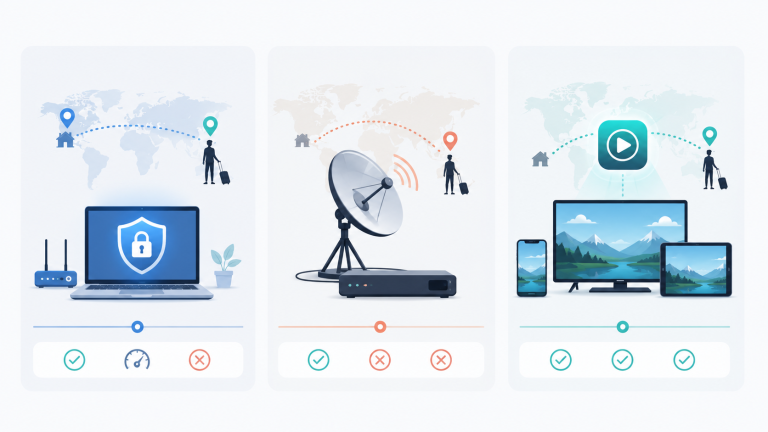
The three ways to watch home TV abroad (honest trade-offs)

Illustration of geo-blocking preventing access to national TV channels from abroad

Option 1 — A VPN plus your home streaming apps

A VPN (Virtual Private Network) reroutes your internet through a server in another country, so websites see that server’s IP instead of your real one. Connect to a server back home, open your usual streaming app, and — in theory — the app thinks you never left.

Where it shines: You keep using the exact apps and accounts you already know. If you only care about one or two services and you already subscribe to them, this can be the cheapest route.

Where it hurts:
The cat-and-mouse game. Big streamers actively hunt for and blacklist VPN server IPs. A server that works today can be blocked next week, sending you hunting for another.
You still need every home subscription. A VPN unlocks the door, but you must still pay for each individual service back home — and manage those payments from abroad, often with a foreign card that some services reject.
Live TV and sport are painful. Many national broadcasters and free public channels require a home payment method, a home login, or a set-top box you left behind. A VPN alone rarely delivers the live national channels — the news, the talk shows, the sport — that expats miss most.
Speed loss. Routing your traffic across the continent adds lag and can cause buffering on HD and 4K streams.

Verdict: Great for a single on-demand app you already pay for. Frustrating as a way to rebuild your whole home TV experience, especially live channels and sport.

Option 2 — Bringing a home TV box or a friend's login

Some people ship a satellite receiver abroad, keep a subscription running at a relative’s address, or “borrow” a login from family back home.


Where it shines: It is familiar, and it feels like a small favour rather than a new service.


Where it hurts: Satellite footprints stop at borders — a dish that worked at home often receives nothing a few countries away. Shared logins break constantly (password changes, too many devices, household-location checks that flag your foreign IP). And you are permanently dependent on someone else remembering to keep it alive. It is a patch, not a solution.


**Verdict:** A stopgap for one or two channels, not a dependable everyday setup.

Option 3 — IPTV: your home channels delivered over the internet

IPTV — Internet Protocol Television — delivers live channels and on-demand films the same way Netflix or YouTube do: as a video stream over your ordinary broadband, with no dish, no cable, and no home set-top box required A good IPTV service aggregates thousands of channels from many countries into one app, so instead of juggling a VPN, five subscriptions, and a borrowed login, you open a single app and your home channels are simply there — live news, entertainment, kids’ channels, and the sport, in HD and increasingly in 4K.


Where it shines:
Everything in one place. Your home country’s live channels and international ones, plus a large on-demand library, under one login.
Works on the devices you already own. Phone, tablet, laptop, Smart TV, or a cheap streaming stick — no special hardware.
Built for people who are not at home. This is the whole point of the category: it is designed for the expat, the traveller, the border-region household.
Live sport that actually works. For many people abroad, the match is the deal-breaker — and this is where a solid IPTV service earns its keep.


Where to be careful: Quality varies enormously between providers. A cheap, overloaded service will freeze during the big game and disappear when you need support. Choosing well is everything — which is exactly what the next section is about.


Verdict: For most expats and long-term travellers who want their whole home-TV life back — live channels, sport, and on-demand together — a reputable IPTV service is the most complete and least fiddly answer in 2026.

How IPTV actually works (in plain English)

Comparison of VPN, home TV box, and IPTV for watching home country television abroad
You do not need to understand the plumbing to enjoy the water, but a little knowledge helps you choose a good provider and fix small problems yourself.

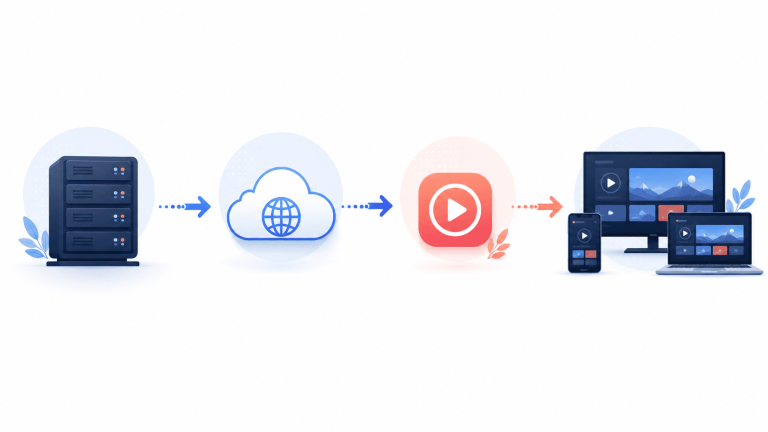
1. The source. Channels are captured and encoded into digital video streams on the provider’s servers.
2. The delivery. Those streams sit on a network of servers (ideally spread across regions, with backups). When you press play, the nearest healthy server sends the video to your device in real time.
3. The app (the “player“). On your end, an IPTV player app receives the stream and shows it like a normal TV channel. Popular players include apps in the “Smarters“/”IPTV player” family available on most platforms.
4. The playlist. Your provider gives you login details (or an M3U/Xtream code). You enter it once, the app loads your channel list and on-demand library, and you are watching.

That is the entire journey: server → internet → your app → your screen. Because it rides on standard broadband, the two things that most affect your experience are (a) the quality of the provider’s servers and (b) the stability of your own internet connection. Keep those two in mind and you will avoid 90% of the problems people complain about.

What to look for in an IPTV provider (an 8-point checklist)

Not all services are equal. Before you pay for anything beyond a trial, run through this list.

1. Stream stability first, everything else second. The number one complaint about cheap IPTV is freezing and buffering — usually because too many customers are crammed onto too few servers. Look for providers that talk specifically about anti-freeze technology, load balancing, and server redundancy, and that back it up with a real uptime figure. A beautiful channel list is worthless if it stutters during the 89th minute.

2. A genuine free trial. Reputable services let you test before you commit — typically a 24-hour trial — so you can check your channels on your devices from your location. Always use it. If a provider will not let you try, walk away.

3. The specific channels you actually want. A 20,000 channels! headline means nothing if it is missing your national broadcaster or your league. Before buying, confirm the exact home channels and the exact competitions you care about are included.

4. 4K / UHD and HD depth. Big numbers are easy; quality is harder. Check that the important channels are offered in HD or 4K, not just a long tail of low-resolution filler.

5. Real device coverage. It should work on Smart TVs (Samsung, LG), Android and Android TV, Amazon Fire TV, iPhone and iPad, Windows and Mac, and set-top boxes like MAG. Multi-device and multi-connection options matter if your household watches on more than one screen at once.

6. Responsive human support. Things occasionally break — a channel goes down, an app needs reconfiguring. You want a provider that answers quickly, ideally over a channel you already use like WhatsApp, not a ticket system that replies in four days.

7. Transparent, honest pricing. Clear plan lengths, clear per-device pricing, and no surprises. Be wary of anything that seems too cheap to be sustainable — that server bill has to be paid somehow, and if it is not, your stream is what suffers.

8. A provider that specialises in your home country. This is the quiet secret. A service built around, say, the Danish market will carry the Danish channels, the Danish sport, and the Danish on-demand catalogue in real depth — and will understand exactly what a Dane abroad is trying to recreate. Which brings us to a concrete example.


A worked example: watching Danish TV abroad

Diagram showing how IPTV streams from server through the internet to your devices
Let’s make this concrete, because watch your home channels is easier to understand through one real market. Take Denmark — a country with a huge diaspora of students, professionals, and retirees spread across Europe and beyond, almost all of whom hit the geo-block wall the moment they land.

A Dane living in Berlin, Málaga, or Dubai typically wants three things back:

The national channels — public-service TV and the big commercial networks — for news, drama, and the shows the family is discussing on the group chat.
The Superliga and international football in reliable HD or 4K, without the stream dropping at kickoff.
A Danish-language on-demand library so the kids keep hearing Danish and nobody misses the series everyone is streaming back home.

This is exactly the niche that a Denmark-focused service fills better than any generic VPN-plus-five-apps arrangement. A specialist Danish provider such as Stream DK is built around this audience: it carries Danish channels alongside 55,000+ international ones and a library of 100,000+ films and series, streams in 4K with anti-freeze technology to keep the football stable, works on every device an expat is likely to own, and offers a 24-hour free trial so you can confirm your channels load from wherever you now live. The company even publishes a dedicated walkthrough on how to watch Danish TV abroad — a useful read whether or not Denmark is your home country, because the method is identical for any nation: find a provider that specialises in your home market, test it on a trial, and set it up on your main screen.

The lesson generalises. Whatever your flag, the winning pattern is the same: a home-market specialist beats a pile of workarounds. Find the service that treats your country as its main event, not an afterthought.

Setting it up: a device-by-device quick start

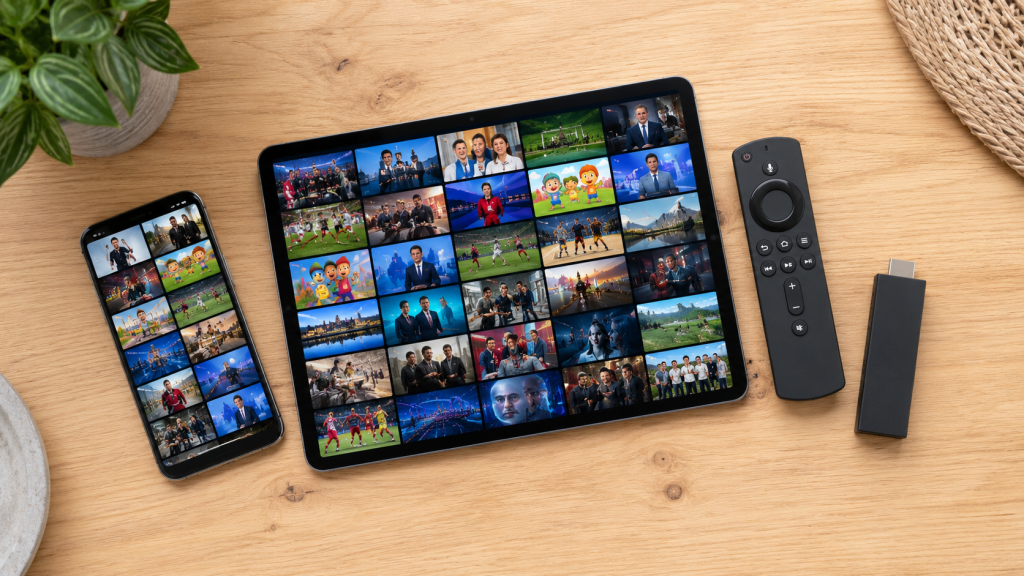
IPTV running on phone, tablet, and streaming stick — multi-device setup
The good news is that modern IPTV setup takes minutes. The pattern is nearly identical everywhere:

On a Smart TV (Samsung / LG):
1. Open the app store on your TV and install an IPTV player (your provider will name the one they support).
2. Open it and enter the login details or Xtream code your provider gave you.
3. Wait for the channel list to load — then browse and play. Pin your favourites to the top.

On Amazon Fire TV Stick / Android TV box:
1. From the home screen, search for and install the recommended IPTV player app.
2. Enter your credentials.
3. Optional: pair a mouse-toggle or use the remote’s directional pad to navigate the guide.

On iPhone / iPad:
1. Install a supported player from the App Store.
2. Add your playlist or Xtream login.
3. Use AirPlay to throw it onto a bigger screen if you like.

On Windows / Mac:
1. Install a desktop IPTV player or use the provider’s web player.
2. Log in, and you have a full electronic programme guide on your computer.

Two universal tips:
Use a wired connection or strong 5GHz Wi-Fi for the main TV. Live 4K sport is the most demanding thing you will stream; give it the best connection in the house.
Do the setup on the free trial first. Confirm your specific channels load from your current country before you pay for a longer plan.

Fixing buffering and freezing (the five-minute troubleshoot)

If a stream stutters, work through these in order — most problems are solved before you reach step 4:

1. Test your internet speed. For smooth HD aim for ~15 Mbps of stable download; for 4K aim for ~25 Mbps or more. A fast-but-unstable line buffers more than a slower steady one.
2. Prefer Ethernet or 5GHz Wi-Fi on the device showing the problem, and move it closer to the router.
3. Close background apps and downloads. A big phone backup or a game update elsewhere in the house steals the bandwidth your match needs.
4. Restart the device and the app. The oldest trick, still the most effective. Power-cycle the router too if freezing is house-wide.
5. If only one channel freezes, it is the provider’s server, not you — message support. A good provider fixes it fast; this is exactly why responsive support (checklist point 6) matters.

A quick way to tell whose fault it is: if every channel and every other app (YouTube, Netflix) also struggles, the issue is your connection. If everything else is fine and only certain channels stutter, the issue is on the provider’s side.

Is this legal? A straight answer

IPTV as a technology is completely legal — it is simply television delivered over the internet, the same mechanism used by every major streaming platform. What matters is the content and the provider. A legitimate service holds the rights to distribute the channels it carries; a shady one may not.

For your own peace of mind:

Choose established, transparent providers with real support, clear terms, and a track record — not an anonymous link posted in a comment section.
Use the free trial and read the terms so you know what you are buying.
Be aware that rules differ by country. Licensing and consumer-protection laws vary between territories; if you are unsure about your specific situation, check the regulations where you live.

Sticking to reputable services keeps you on the right side of both the law and your own expectations for quality.

Frequently asked questions

Do I still need a VPN if I use IPTV?
Usually no. A good IPTV service delivers your channels directly, so you are not fighting the VPN-detection arms race. Some users still run a VPN for general privacy, but it is not required to watch.

Will it work on the TV I already own?
Almost certainly. Modern IPTV runs on Samsung and LG Smart TVs, Fire TV, Android TV, phones, tablets, and computers. If your TV is older, a €30 streaming stick turns it into a fully capable IPTV screen.

How much internet speed do I need?
Roughly 15 Mbps for reliable HD and 25 Mbps+ for 4K — and stability matters more than headline speed. Most modern home broadband abroad handles this easily.

Can my family watch different channels at the same time?
Yes, if you choose a plan with multiple simultaneous connections. Look at the per-device options when you pick a plan — households usually want two or more screens.

What is the single most important thing when choosing?
 
Stream stability. Test it on a free trial during something demanding — a live match is the perfect stress test. If it holds up there, it will hold up anywhere.

The bottom line

Living abroad should mean gaining a new home, not losing your old one. Geo-blocking is an accident of licensing contracts, not a law of nature — and in 2026 you have a clean way around it. A VPN can rescue a single app you already pay for; borrowed logins limp along for a channel or two. But if you want your whole home-TV life back — the live news, the on-demand series, and above all the sport, working reliably on every screen in the house — a reputable, home-market-focused IPTV service is the most complete answer available.

The playbook is short: pick a provider that specialises in your country, put its free trial through a real stress test, and set it up on your main screen. Do that, and the next time you sit down after a long day in a country that is still learning your name, your television will finally remember exactly where you are from.